Dancing Dog AI
Dancing Dog AI: Single Ladies Dog Dance
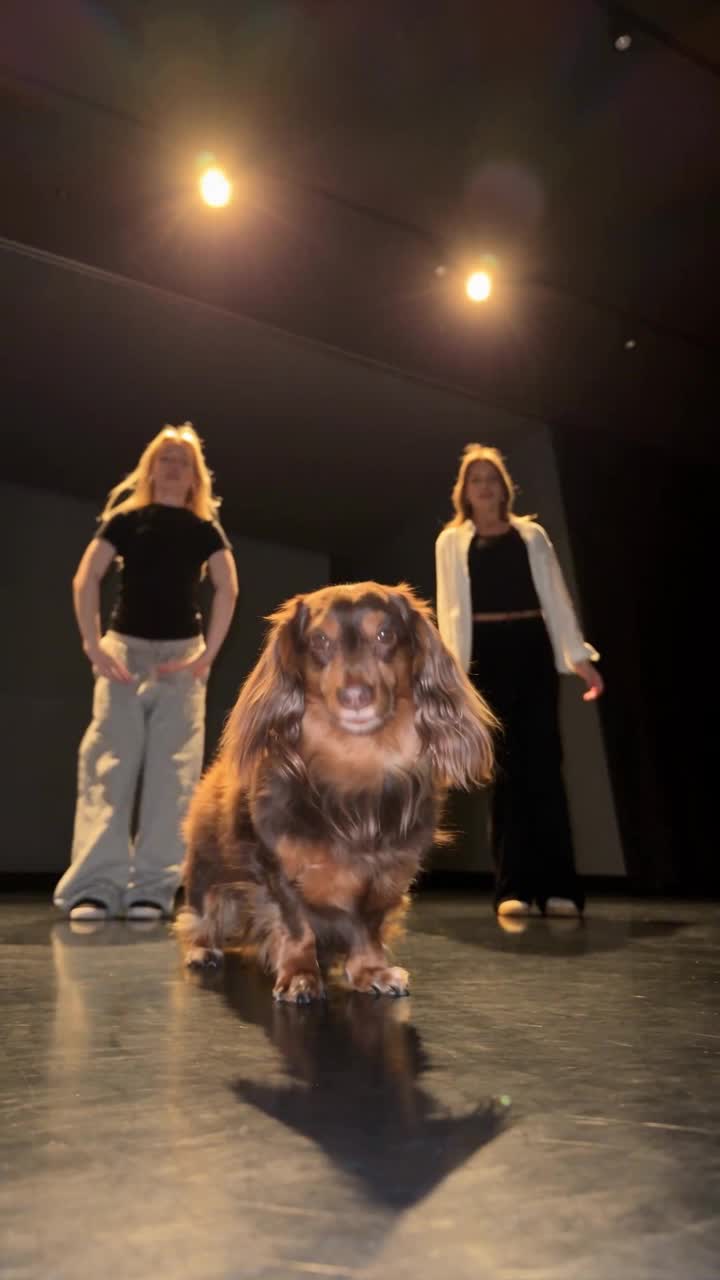
Upload one clear photo of your dog or cat, and Dancing Dog AI puts your pet front and center in the viral Single Ladies routine on Wan 3.0: standing on all fours on a spotlighted dance floor, tossing its head and ears on the beat while two dancers perform behind it. No reference video to upload, no mobile app to install, and one-time credit packs starting at $6.90.
- One pet photo
- 9:16 vertical · 480p or 720p
- From $6.90 per video

Dancing Dog AI
Put your dog or cat front and center on a spotlighted dance floor, tossing its head and ears on the Single Ladies beat while two backing dancers perform behind it.
Add the photos for each role. Your effect settings are ready.
Only you can view this video. We will not use it or its prompt as a public example.
Credit packs
$6.90
400 credits
1 Standard video · 480p
$12.90
800 credits
1 HD video · 720p or 2 Standard videos
One-time purchase. Credits work for every effect and in the Studio.
Sign in to buy credits and generate your effect.
From a thought to a moving picture
Your next scene starts here.
Add the photos for each role on the left, choose the quality, and start your effect.
How to Use Dancing Dog AI
- 1.Sign in above and add one clear JPG, PNG, or WebP photo of your dog or cat facing the camera, using the crop tool if needed.
- 2.Select Standard 480p (400 credits) or HD 720p (800 credits) and confirm the live credit quote.
- 3.Click Generate effect, preview the 9:16 MP4 with sound to check the head tosses, and download it from your private Assets library.
What is the Single Ladies dog dance trend?
The trend places a pet in the front spot of a dark, spotlighted dance studio while two backing dancers perform Beyoncé's "Single Ladies (Put a Ring on It)" behind it, with the pet tossing its head and ears right on the beat.
The viral clip shown here stars Odie, a long-haired dachshund posted by @king_odiee on October 4, 2026 ("I learned some new dance moves from my girl @Beyoncé"). Unlike generic motion-transfer tools that ask you to hunt down and upload a dance video of your own, this template has the stage and choreography built in for dogs, cats, and other four-legged pets.
@king_odiee
Your pet takes the stage
Source video by an independent creator.
@king_odiee on TikTokWhere the routine came from
Beyoncé released "Single Ladies (Put a Ring on It)" in 2008, and its minimalist black-and-white trio choreography has passed one billion views on YouTube. Moving the lead spot to a deadpan house pet while the two dancers go all out behind it turned a classic pop routine into an instant pet format.
What your video shows
- 01
Meet the lead
Your pet stands on all fours in the foreground facing the low camera, framed ahead of the two backing dancers.
- 02
Catch the beat
The first sharp head toss lands directly on the opening accent of the routine.
- 03
Ears and fur move
Your pet turns and tosses its head on rhythm while the dancers flip their hair in the spotlight.
- 04
Face the camera
The final beat brings your pet's face squarely back toward the lens.
Input, format, and pricing
Wan 3.0 pairs your pet portrait with a prepared stage reference. The embedded TikTok above is an independent creator video and is not used as generation input.
| Input file | One clear pet photo (JPG, PNG, or WebP, up to 10 MB, 240–8,000 px per side within 1:8–8:1; auto-resized up to 2048 px with in-browser crop after sign-in; transparent PNG/WebP flattened on white as JPG; no reference MP4 upload needed) |
|---|---|
| Supported subjects | Dogs, cats, and other four-legged pets with a clear face (human portraits are not supported here; for people, use Hotel Lobby AI or AI Singing Cat) |
| Posture & traits | Tuned to keep your pet on all fours on the studio floor with its own breed shape, coat markings, and ears rather than a two-legged human rig |
| Kept from the template | Low-angle camera, dark spotlighted dance floor, and the two backing dancers behind your pet |
| Output format | Native 9:16 vertical MP4 ready for TikTok, Reels, and Shorts |
| Sound | The prompt instructs Wan 3.0 to carry over the reference music so head tosses match the beat; preview sound before posting |
| Standard · 480p | 400 credits ($6.90 one-time Starter pack = 1 Standard video, zero subscription) |
| HD · 720p | 800 credits ($12.90 one-time Creator pack = 1 HD video or 2 Standard videos so two pets can each get a turn; shared with the 43-model Video Studio) |
| Model | Wan 3.0 |
How to keep your pet's breed and ears recognizable
Choose one pet seated or standing at eye level in daylight, at least 1,000 pixels on the short side, showing the full head, both ears, and part of the chest. Contrast matters more than scenery: photograph a dark-coated dog against a light wall and a pale pet against a darker backdrop so ear edges read cleanly.
Remove bulky harnesses, cones, or hats that hide coat markings, and avoid group pet photos. If a dim or distant photo causes the output to drift toward the brown long-haired dachshund in the reference or softens ear shapes during a toss, switch to a closer front-facing portrait and render in HD 720p.
Photos you can’t use
Upload only photos you own or have permission to use, and only of people who have agreed to appear. Our Terms do not allow:
- Photos of public figures, or of anyone who has not agreed, including the performers of the original video.
- Nudity, sexual content, or anything unsafe involving minors.
- Graphic violence, threats, or content that encourages harm.
- Hate symbols, harassment, or content that targets a group.
- Images you do not have the rights to, such as screenshots from films or games or another creator’s artwork.
Requests that break these rules can be refused by our checks or by the video provider. If a generation fails, its credits return to your balance. Read the full Terms of Use.
FAQ
Frequently asked questions
Answers about your photos, the finished video and credits.
Do I need to upload a reference dance video for my dog to copy?
No. Unlike general motion-control editors that ask you to supply a separate dance clip, the spotlighted stage, backing dancers, and beat timing are already configured on our server. You only upload one still photo from your camera roll.
Can I swap in a different song on TikTok or Reels afterward?
Yes. Export the MP4, mute or replace its audio track inside TikTok, Instagram Reels, or your video editor, and align the new song's downbeat with your pet's first big head toss.
Is there any subscription or camera permission required, and what is the refund rule?
No app download, camera access, or recurring plan is required; you pick an existing photo file in your browser and buy credits once when needed. Purchased credits never expire as long as your account remains active, and a pack with 0 credits used can be refunded in full within 7 days via support@movireva.com.
What happens if a generation fails?
Reserved credits return to your account balance automatically if a confirmed generation fails or times out.