Hotel Lobby AI
Hotel Lobby AI: Two Photos in the Orange Booth
Upload two photos and Hotel Lobby AI places both subjects side by side in the viral orange-studio rap remake on Wan 3.0: Left performer photo raps at the hanging microphone, Right performer photo points, hypes, and checks the watch, and the original track plays in a 9:16 vertical MP4. One-time credit packs start at $6.90 with zero monthly subscription.
- Two subject photos
- 9:16 vertical · 480p or 720p
- From $6.90 per video

Hotel Lobby AI
Place two consenting people, two pets, or one of each into the orange-booth rap duet: Left performer photo raps at the hanging mic while Right performer photo points, hypes, and checks the watch.
Add the photos for each role. Your effect settings are ready.
Only you can view this video. We will not use it or its prompt as a public example.
Credit packs
$6.90
400 credits
1 Standard video · 480p
$12.90
800 credits
1 HD video · 720p or 2 Standard videos
One-time purchase. Credits work for every effect and in the Studio.
Sign in to buy credits and generate your effect.
Example result
What your video looks like.
Silent Wan 3.0 motion preview with AI-generated stand-ins. Your exported video replaces both roles with your two photos and includes the Hotel Lobby audio track.
Add the photos for each role on the left, choose the quality, and start your effect. Your result replaces this example.
How to Use Hotel Lobby AI
- 1.Sign in above and add two clear JPG, PNG, or WebP images to Left performer photo and Right performer photo, using the crop tool if needed.
- 2.Select Standard 480p (400 credits) or HD 720p (800 credits) and review the live credit quote.
- 3.Click Generate effect to render your 9:16 MP4 with the Hotel Lobby track to your private Assets library.
What is the orange-booth rap trend?
The trend remakes Quavo and Takeoff's performance of "HOTEL LOBBY (Unc & Phew)" on A COLORS SHOW, where two performers share one hanging microphone in a plain orange booth: one raps at the mic, and the other points, hypes, and checks his watch. The title comes from the song rather than a literal hotel lobby.
Also called the Unc & Phew trend, the format took off on TikTok when creators swapped the duo for cats and pairs of friends. Here, your left upload takes the vocal spot and your right upload takes the hype role using consenting people, pets, or one of each.
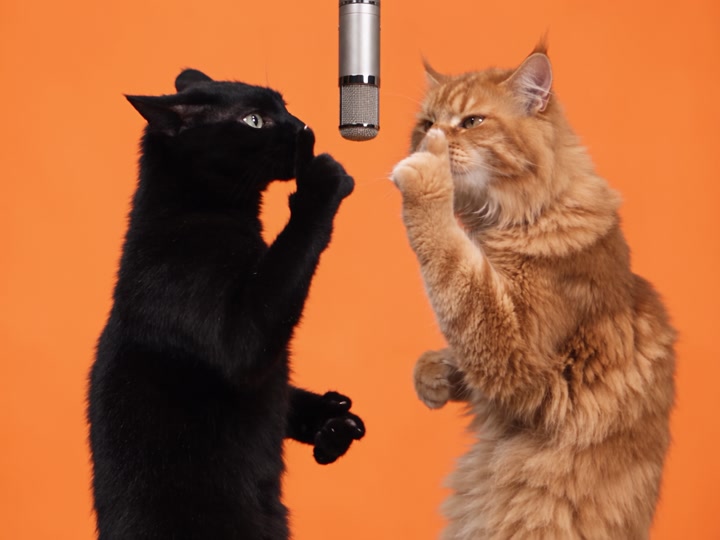
@therealmeowfia
The Hotel Lobby cats
Source video by an independent creator.
@therealmeowfia on TikTokWhere the original performance came from
Quavo and Takeoff released "HOTEL LOBBY (Unc & Phew)" on May 20, 2022, produced by Murda Beatz, Keanu Beats, and Fabio Aguilar. COLORS premiered their studio performance on June 17, 2022, passing 139 million views on YouTube before Takeoff was killed in Houston on November 1, 2022.
When AI remakes spread across TikTok in September 2026, Quavo reshared the real clip ("Aye Take we viral again The original!!!"), and fans asked creators to respect Takeoff's memory. Use photos of yourself, consenting friends, or your own pets, and never upload Quavo, Takeoff, or other public figures.
What your video shows
- 01
Two at the mic
Both subjects stand waist-up side by side in the orange booth beneath one hanging studio microphone.
- 02
Point and hype
The right-side performer points across and hypes as the left-side performer raps into the mic.
- 03
The watch check
The right-side performer opens both hands and lifts a wrist to check the watch right on the beat.
- 04
Full-track finish
Both performers hold their left and right positions to the end with the original track playing underneath.
Role assignment, format, and pricing
Wan 3.0 combines your two uploaded portraits with a silent motion reference clip and a dedicated audio track. The embedded TikTok above is an independent creator video and is not used as generation input.
| Input files | Two clear front-facing photos, one per performer (JPG, PNG, or WebP, up to 10 MB each / 20 MB combined, 240–8,000 px per side; auto-resized up to 2048 px with in-browser crop after sign-in; transparent PNG/WebP flattened on white as JPG) |
|---|---|
| Left performer photo | Replaces the left performer rapping into the hanging microphone, lip-synced to the vocal track |
| Right performer photo | Replaces the right performer pointing across, opening both hands, and checking the watch |
| People & pets | Two consenting people, two pets, or one of each; pets stand on hind legs, gesture with front paws, and keep their own fur without added outfits |
| Output format | Native 9:16 vertical MP4 with both subjects and the hanging mic in frame for TikTok, Reels, and Shorts |
| Sound | Original Hotel Lobby audio track included automatically as a dedicated audio file; no music upload needed |
| Standard · 480p | 400 credits ($6.90 one-time Starter pack = 1 Standard video, zero subscription) |
| HD · 720p | 800 credits ($12.90 one-time Creator pack = 1 HD video or 2 Standard videos; unused credits also work in the 43-model Video Studio) |
| Model | Wan 3.0 |
How to choose two photos that stay distinct
Pick waist-up photos shot at eye level in even daylight, with one person or pet per image and at least 1,000 pixels on the short side. Keep faces, hairlines, or muzzles and both ears uncovered. Your photos also supply each person's clothing; the orange wall replaces photo backgrounds.
To prevent the two faces from blending or drifting during head turns, choose two photos with similar brightness rather than pairing a dark indoor selfie with a harsh outdoor shot. Choose HD 720p when finer facial features, glasses, or patterned fur matter.
Photos you can’t use
Upload only photos you own or have permission to use, and only of people who have agreed to appear. Our Terms do not allow:
- Photos of public figures, or of anyone who has not agreed, including the performers of the original video.
- Nudity, sexual content, or anything unsafe involving minors.
- Graphic violence, threats, or content that encourages harm.
- Hate symbols, harassment, or content that targets a group.
- Images you do not have the rights to, such as screenshots from films or games or another creator’s artwork.
Requests that break these rules can be refused by our checks or by the video provider. If a generation fails, its credits return to your balance. Read the full Terms of Use.
FAQ
Frequently asked questions
Answers about your photos, the finished video and credits.
What should I inspect before posting the finished duet?
Play the rendered MP4 with sound on. Confirm that Left performer photo stays on the left and Right performer photo stays on the right throughout the routine, check that neither face drifts during the wrist-watch gesture, and verify that the left performer's mouth movement lines up with the rap vocal. If a face blurs on a turn, a sharper front-facing portrait helps more than re-running the same image.
Do credits expire, and can an unused pack be refunded?
Purchased credits never expire as long as your account remains active, and there is no recurring plan or auto-top-up to cancel. If a purchased pack has 0 credits used, you can request a full refund within 7 days by emailing support@movireva.com with your order ID.
When do reserved credits return if a generation fails?
If a confirmed generation fails or times out on the provider side, reserved credits return to your balance automatically. Completed renders use the quoted credits and are not refunded for creative variations.
Can I use a different song or custom background here?
This template is fixed to the orange booth and the Hotel Lobby routine. To direct an original two-character scene with your own setting and camera prompt, use Image references in the 43-model Video Studio instead.